Windows Desktop
Microsoft Windows Desktop is a product line of proprietary graphical operating systems developed and marketed by Microsoft.
Editions
- Windows Home
- Windows Pro
- Windows Pro for Workstations
- Windows Pro Education
- Windows Education
- Windows Enterprise
- Windows SE
Versions
- Windows 10
- Windows 11
License Model
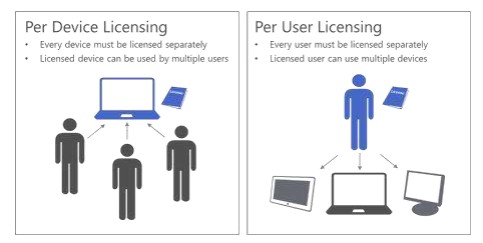
Device and User licenses are available for Windows Desktop.
- License by Device
Device licenses are assigned to an individual device and any user may use Windows on that device.
- License by User
User licenses are assigned to a user who may then use Windows on up to 5 devices.
- Windows VDA per User
- Windows Enterprise per User
- Windows Enterprise per User Add-on
License Types
Microsoft offers various licensing types to accommodate the diverse needs of users and organizations.
Retail Licenses
A full Packaged Product (FPP) is the retail version of a Microsoft licensed product. Ideal for small businesses or individual users requiring a one-time purchase of Microsoft Office products. A “Retail” license refers to the one you acquire when purchasing a copy of Windows from your local store or an online retailer. The Windows Retail license and product key can be transfered to another computer as long as you deactivate the old device.
Retail License Availability
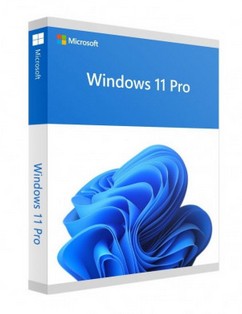
- Windows 11 Home / Pro
- Windows 10 Home / Pro
OEM Licenses
Come pre-installed on new hardware, offering a cost-effective solution for those purchasing new devices.
OEM License Availability
- Windows 11 Home / Pro
- Windows 10 Home / Pro
Volume Licenses
Tailored for organizations that need to purchase licenses in bulk, providing flexibility and potential cost savings.
A “Volume” license is designed for large businesses, education, and government entities. Usually, a volume license allows organizations to use one master product key to activate any installation of Windows.

- Licenses that are purchased through the volume licensing agreements are upgrade licenses only.
- There needs to be a qualifying operating system already on device, before volume license can be assigned to it.
- The only exception is that customers can acquire the Windows VDA license to remotely access Windows 11 running in a virtual environment regardless of whether the user’s device has a Qualifying Operating System or not.
Windows 10 / 11 availability in Volume Licensing
| Windows 11 Offering | Open License CSP | Open Value and Subscription | Select Plus and MPSA | Enterprise Agreement and Subscription |
|---|---|---|---|---|
| Windows 11 Pro | ✓ | ✓ | ||
| Windows 11 Enterprise LTSC 2021 | ✓ | ✓ | ||
| Windows 11 Enterprise | ✓ | ✓ | ✓ | |
| Windows 11 VDA | ✓ | ✓ | ✓ |
| Windows 10 Offering | Open License CSP | Open Value and Subscription | Select Plus and MPSA | Enterprise Agreement and Subscription |
|---|---|---|---|---|
| Windows 10 Pro | ✓ | ✓ | ||
| Windows 10 Enterprise LTSC 2019 | ✓ | ✓ | ||
| Windows 10 Enterprise | ✓ | ✓ | ✓ | ✓ |
| Windows 10 VDA | ✓ | ✓ | ✓ |
Qualifying OS Reference
Qualifying Operating Systems can be acquired by:
- Original equipment manufacturer (OEM)
- Full Packaged Product (FPP – retail)
Windows upgrade licenses acquired through a Commercial Licensing agreement may only be installed or activated on devices licensed to run one of the Qualifying Operating Systems below:
| Qualifying Operating Systems (Per Device Licenses) | Windows 10 (EA)/Open Value Company Wide(OV-OW) | Windows 10(MPSA)/SelectPlus/Open | Windows 11 (EA)/Open Value Company Wide(OV-OW) | Windows 11 (MPSA)/SelectPlus/Open |
|---|---|---|---|---|
| Windows 11 Enterprise, Pro, Pro for Workstations | ✓ | ✓ | ||
| Windows 11 Education, Home | ||||
| Windows 10 Enterprise, Pro, Pro for Workstations | ✓ | ✓ | ✓ | ✓ |
| Windows 10 Education, Home | ||||
| Windows 8/8.1 Enterprise, Pro | ✓ | ✓ | ✓ | ✓ |
| Windows 8/8.1 | ||||
| Windows 7 Enterprise, Professional, Ultimate | ✓ | ✓ | ||
| Windows 7 Home Premium, Home Basic, Starter Edition |
Subscription Licenses
Such as Microsoft 365, offer ongoing access to Microsoft products, ensuring users always have the latest versions.

Educational, Non-Profit, and Government Licenses
License Mobility & Reassignment
- License Mobility is not available for Windows Desktop.
- Per Device license assignment is permanent unless Customer has Software Assurance for that device.
- The Licensed User must be the Primary User of at least one device licensed with a Qualifying OS. This one device must also be the Primary User’s primary work device.
- VDA Per Device and Per User licenses may be assigned to any user or device.
License Suites
TBD
Software Assurance
Windows 11 Enterprise includes Software Assurance which gives the following rights:
- Virtual Desktop Access
Rights to access virtual machines hosted in a Virtual Desktop Infrastructure.
- Local virtualization
Rights to access up to four virtual OSEs on a licensed device.
- MDOP
Microsoft Desktop Optimization Pack tools.
- Flexible Virtualization Benefit
Rights to install software on Authorized Outsourcers’ servers.
- Ongoing access to new Long-Term Servicing Channel builds.
Windows 11 Pro and Windows Enterprise LTSC 2021 licenses do not include Software Assurance.
Downgrade Rights
Windows 11 Reference:
| Can be donwgraded to: | OEMPro | VolumePro | VolumeEnterprise |
|---|---|---|---|
| Windows 10 Enterprise | ✓ | ||
| Windows 10 Pro | ✓ | ✓ | ✓ |
| Windows 8/8.1 Enterprise | ✓ | ||
| Windows 8/8.1 Pro | ✓ | ✓ | |
| Windows 7 Enterprise | ✓ | ||
| Window 7 Professional | ✓ | ✓ | |
| Windows Vista Enterprise | ✓ | ||
| Windows Vista Business | ✓ | ✓ | |
| Windows XP Professional | ✓ | ✓ | |
| Windows 2000 Professional | ✓ | ✓ | |
| Windows 95 / 98 / NT | ✓ | ✓ |
Licensing Virtual Machines (VMs) / Containers
Virtual Desktop Infrastructure (VDI)
Windows Activation
Every copy of Windows 11 must be activated with a valid product key.
OEM / Retail Activation
- Via the Internet
- Via the Telephone
Volume Activation
- Key Management Services (KMS)
Activation is done against a service hosted within an organization, enabling organizations to activate systems within their network, eliminating the need for individual computers to connect to Microsoft.
- Multiple Activation Key (MAK)
Volume license key that is used for one-time activation with activation services that are hosted by Microsoft. This method is useful for smaller organizations, and for computers which are infrequently connected to the organization’s network.
- Active Directory-based activation
Is a role service that allows organizations to use Active Directory Domain Services (ADDS) to simplify the task of maintaining volume activation services for a network.
Servicing Channels
Servicing Channels allow customers to designate how frequently their individual devices are updated for new features.
- General Availability Channel
- New functionality is provided with annual feature update releases.
- As long as a device isn’t set to defer feature updates, any device in this channel will install a feature update as soon as it’s released.
- Applies to both Windows Pro and Enterprise editions.
- Long-Therm Servicing Channel (LTSC)
- Feature updates every 2-3 years.
- Regular cadence for security and quality fixes to stay up to date.
- Each LTS has 5years mainstream + 5years extended support.
- A Windows Enterprise LTSC edition is available through some Volume Licensing agreements and CSP.
- Used for specialized systems—such as PCs that control medical equipment, point-of-sale systems, and ATMs—often.
- Windows Enterprise customers may choose to deploy this edition.