MS Skype for Business
Skype for Business is a communications service that connects people for conversations anytime and from anywhere. It gives users access to information about presence, and enables instant messaging, audio and video calling, and extensive web conferencing capabilities.
Editions
- Skype for Business (single edition)
Versions
- Skype for Businesses 2016
- Skype for Businesses 2019
- Skype for Business LTSC 2021
- Skype for Business for Microsoft 365
Requirements
- Microsoft Windows Server
- Skype for Businesses Server solution has an infrastructure requirement for Windows Server.
- Users therefore need to be covered with the relevant licenses for this product.
- Microsoft SQL Server
- Skype for Businesses Server solution has an infrastructure requirement for Microsoft SQL Server.
- Users must be licensed in the underlying infrastructure with the relevant licenses.
License Model
Server License + CAL
Purchase a Server license for each server, and then purchase Client Access Licenses (CALs) for either users or devices.
- Server License
- Skype for Business Server License
- Client Access License (CAL)
- Skype for Business Standard CAL - User / Device CAL
- Skype for Business Enterprise CAL - User / Device CAL (Conference)
- Skype for Business Plus CAL - User / Device CAL (Enterprise Voice + Telephony)
- Skype for Business has only single type of server license.
- Everyone accessing Skype For Business Server need to have a Standard CAL assigned.
- Skype for Business Enterprise CAL and Skype for Business Plus CAL are only the additive CALs.
- Enterprise CAL or Plus CAL can be added only to user / device with assigned Skype for Business Standard CAL.
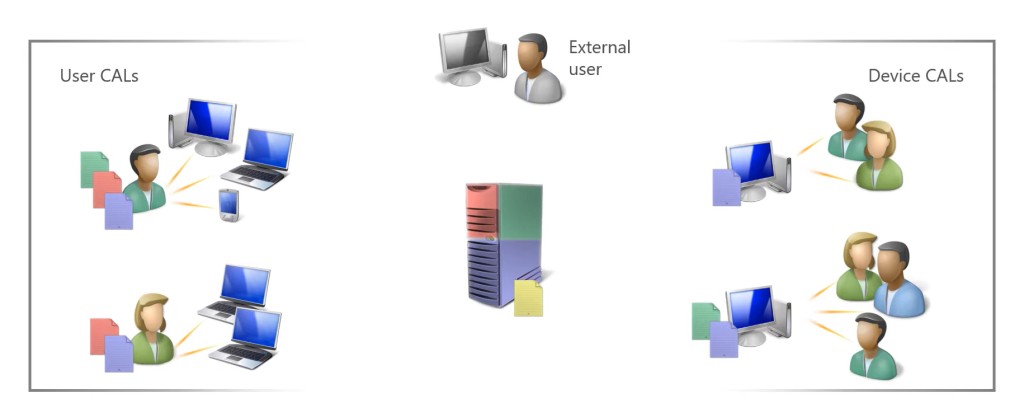
License Rules
Server License
- Skype for Business Server License
- A single server license must be assigned to the physical server.
Client Access License (CAL)
A Client Access Licenses (CALs) must be purchased for either users or devices.
- Skype for Business Standard CAL
- The instant messaging and presence integration functionality.
- This CAL must be assigned for either users or devices accessing Skype for Business server.
- Skype for Business Enterprise CAL (additive)
- For audio, video and web conferencing in addition to the Standard CAL.
- Skype for Business Plus CAL (additive)
- For enterprise voice and telephony in addition to the Standard CAL.
- Choose additional CALs based on user / device required functionality.
- Skype for Business Enterprise CAL and Business Plus CAL are only the additive CALs.
- Both Enterprise CAL and Business Plus CAL can add only in addition to the Standard CAL.
License Mobility & Reassignment
- License Mobility is not available for Exchange Server.
- Licenses can be reassigned to servers no more frequently than once every 90 days.
Software Assurance
- Skype for Business Server licenses purchased with Software Assurance have License Mobility across Server Farms rights which allows the reassignment of Server licenses to other physical servers in a server farm as often as required.
- Software Assurance provides rights for Server Disaster Recovery (“Permitted Use of Backup Instances”).
Licensing External Users
- Licensed with Server.
- External users who attend a Skype for Business Meeting, for example, are licensed by the Skype for Business Server license and there are no requirements for CALs, or other licenses, for these users.
- External users are users who are not the licensee’s or its affiliates’ employees or on-site agents or contractors.
Downgrade Rights
None.
Licensing Virtual Machines (VMs) / Containers
A Server license must be assigned to a single physical server which licenses Skype for Business Server to be run in either the physical operating system environment or a single virtual machine on that server.
Skype for Business Clients
Users have a choice of clients to access their Skype for Business Server service:
- Microsoft Skype for Business
The complete Skype for Business client, which is typically installed with Microsoft 365.
- Microsoft Skype for Business Basic
A free of charge, less feature-rich Skype for Business client.
- Microsoft Skype for Business on Mac
The Skype for Business client for Mac OS X desktop and laptop computers.
- Microsoft Skype for Business for mobile devices
Available for Android and iOS devices from the relevant stores.
- Microsoft Skype for Business Web App
Available for individuals invited to Skype for Business Meetings who do not have a Skype for Business client installed. It enables a rich meeting experience via the browser.
Note that internal users using any of these clients must be licensed with the relevant CALs.