MS Windows Server
Windows Server is a group of server operating systems that has been developed by Microsoft since 1993.
Editions
- Windows Server Datacenter
- Windows Server Standard
- Windows Server Essentials
- Windows Server Enterprise (obsolete)
Versions
- Windows Server 2016
- Windows Server 2019
- Windows Server 2022
- Windows Server 2025
License Model
Core-based + CAL
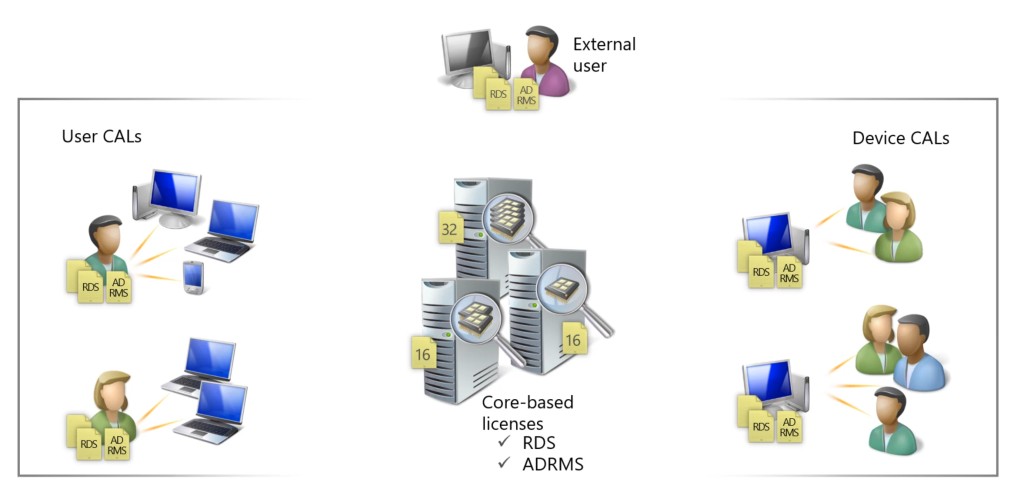
- Core-Based License
- Windows Server Standard 2/16 Core License
- Windows Server Datacenter 2/16 Core License
- Client Access License (CAL)
- Windows Server CAL - User / Device
- Remote Desktop Services (RDS) CAL - User / Device
- Active Directory Rights Management Services (ADRMS) CAL - User / Device
- Core CAL Suite - User / Device
- Enterprise CAL Suite - User / Device
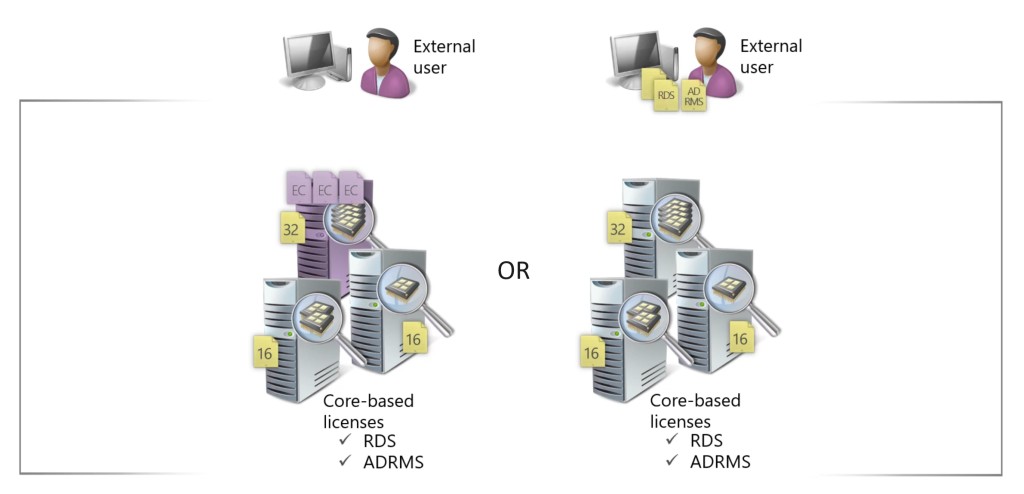
- External Connector (for external users / devices)
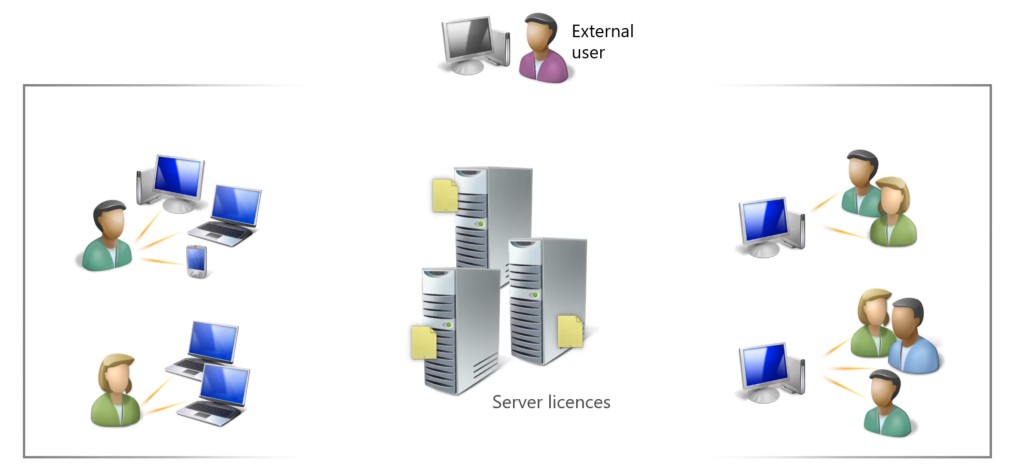
Single Server License
- A single server license must be assigned to the physical server.
License model reference:
| Windows Server Edition | Server license | Core-Based + CAL |
|---|---|---|
| Essentials | ✓ | |
| Standard | ✓ | |
| Datacenter | ✓ |
License Rules
Core-based License + CAL
- Core-based License
- A Core license must be assigned to each physical core in the server.
- Core licenses are purchased in 2-packs or 16-packs from resellers.
- Minimum of 8 Core licenses per processor.
- Minimum of 16 Core licenses per server.
- Client Access License (CAL)
- Windows Server Client Access Licenses are required for either users or devices.
For example, a single processor server with 4 cores requires 16 Core licenses, and a 4-processor server with 6 cores on each processor requires 32 Core licenses.
Single Server License
- A single server license must be assigned to each physical.
- Windows Server Client Access Licenses are NOT required.
- Single Server License model is available only for Windows Server Essentials.
- Windows Server Essentials is restricted to 25 users and 50 devices.
- There is no specific installation media - instead an Essentials product key is used to activate the Standard edition of Windows Server and you get all the same features.
- Windows Server Essentials is available to be purchased through OEMs only.
- Windows Server Essentials can have technical limitation like absence of Remote Desktop Services.
License Mobility & Reassignment
- License Mobility is not available for Windows Server.
- Licenses can be reassigned to servers no more frequently than once every 90 days.
- License Mobility IS available for the External Connector licenses.
License Suites
- Core Infrastructure Server (CIS) Suite Standard
- Core Infrastructure Server (CIS) Suite Datacenter
Software Assurance
- 24x7 Problem Resolution Support
- Disaster Recovery Rights (SA required for both Server licenses and CALs)
- E-Learning
- Planning Services
- Self-Hosting Use Rights
- Eligibility for Step-Up license
- Possibility to license per Virtual Machine (VM)
Licensing External Users
External users can be licensed with either individual User or Device CALs or with a Windows Server External Connector license.
- A physical server must be licensed appropriately with Windows Server Standard or Datacenter licenses and then a single External Connector license is assigned to the server. There is just one edition of the External Connector license used regardless of whether the underlying server is licensed with Windows Server Standard or Datacenter edition.
- The External Connector license allows unlimited external users to connect to and use the services of the physical server and any virtual machines running on the server.
- If an organization has more than approximately 70 external users, it is likely to be most cost-effective to use an External Connector license to license those users.
Downgrade Rights
Customers can choose to deploy an earlier version and, sometimes, an alternative edition.
Downgrade rights reference:
| Licensed Product | Target Edition | Target Version |
|---|---|---|
| Windows Server Datacenter | Windows Server Datacenter Windows Server Standard Windows Server Essentials | same or earlier |
| Windows Server Standard | Windows Server Standard Windows Server Essentials | same or earlier |
| Windows Server Essentials | Windows Server Essentials | same or earlier |
Step-Ups License
- Customers who have existing Windows Server Standard Core licenses with Software Assurance may purchase Step-Up licenses to move to Windows Server Datacenter Core licenses.
- The Step-Up license is priced at the difference in price of the two licenses and SA.
Licensing Virtual Machines (VMs) / Containers
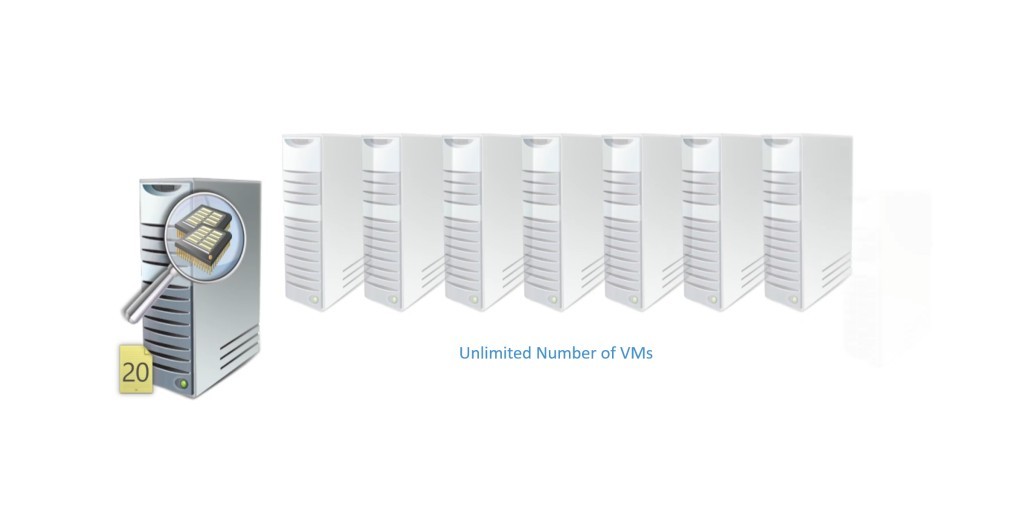
Windows Server Datacenter
- The server must be fully licensed with Core licenses (as described in the Core-based Licensing section).
- An unlimited number of virtual machines may be run on the server.
Windows Server Standard
- The server must be fully licensed with Core licenses (as described in the Core-based Licensing section)
- Only 2 virtual machines may be run on the server.
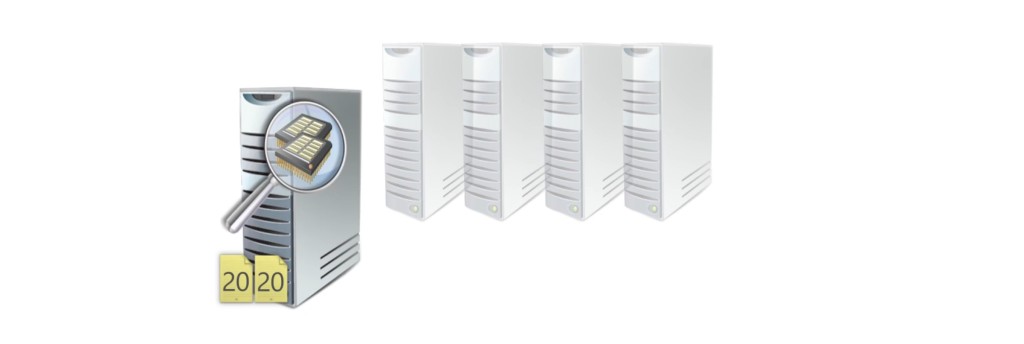
- The server must be licensed again to run a further 2 virtual machines (license stacking).
For example, a single processor server with 8 cores requires 16 Core licenses to run 2 VMs. A further 16 Core licenses must be assigned to the server to run another 2 VMs.
Windows Server Essentials
- Host virtualization rights and rights to run in a single physical or virtual OSE.
- Restricted to 25 user accounts and 50 devices.
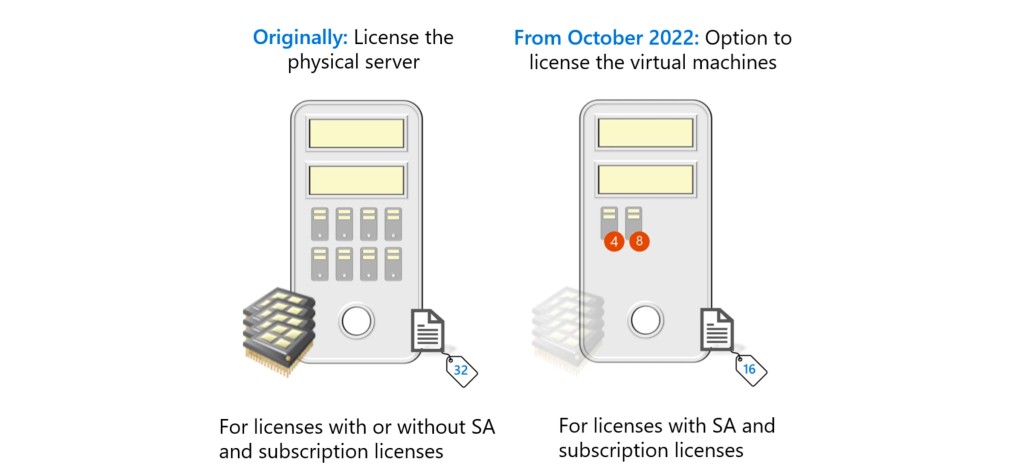
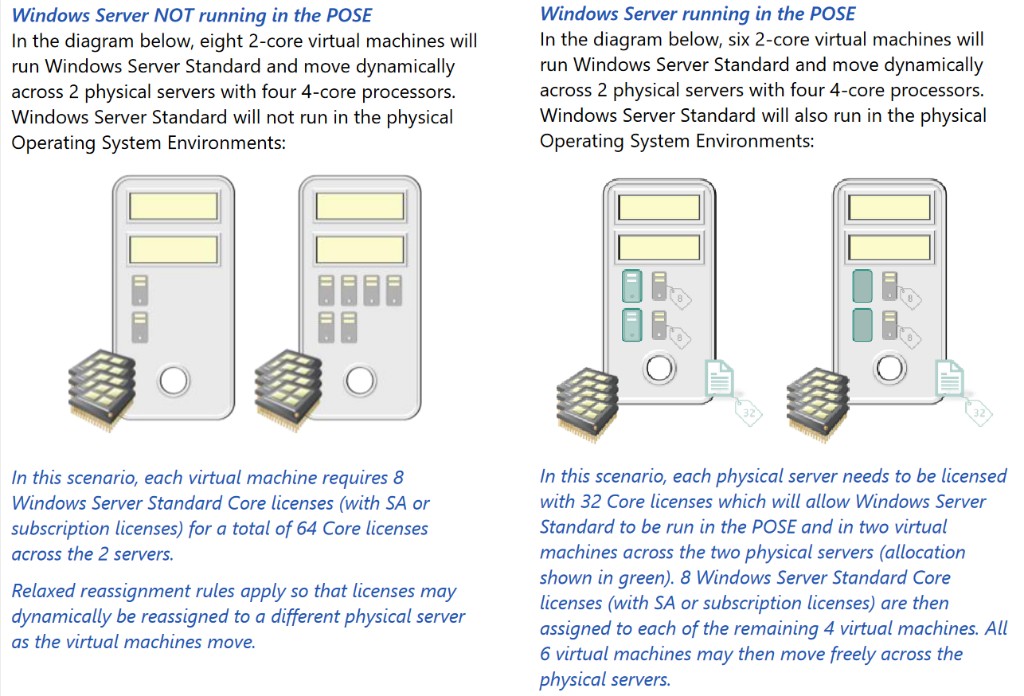
License for Virtual Machine (only with SA)
- Introduced in October 2022 for customers with Software Assurance or Subscription licenses.
- All virtual cores in a virtual machine must be licensed.
- Minimum of 8 Core licenses assigned to a virtual machine.
- Windows Server Client Access Licenses (CALs) are required for either users or devices.
- CALs must also have active SA or be subscription licenses. Note that this includes licenses such as Microsoft 365 E3 which is a subscription license including CAL Equivalent rights for Windows Server.
- Customers choosing this licensing model do not have rights to run Windows Server in the physical Operating System Environment (OSE).
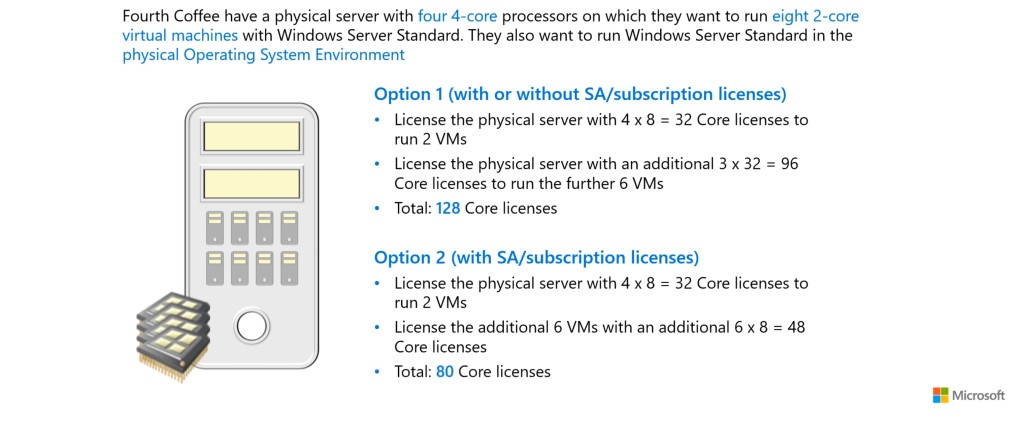
- Scenario: Single Server
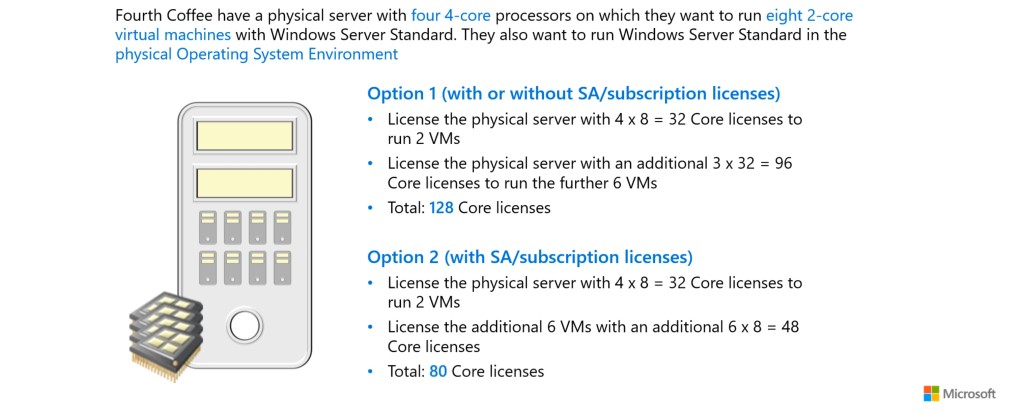
- Scenario: Two Servers
Failover Scenarios
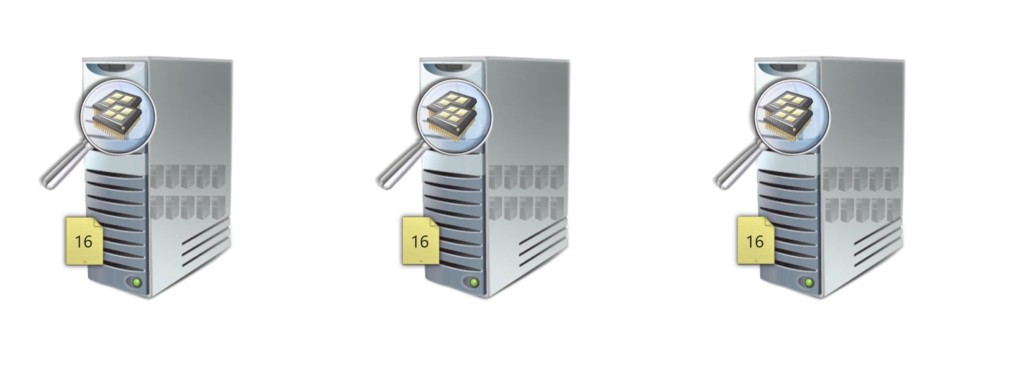
License across Server Farm
- As the Mobility is not available for Windows Server proper licenses must be assigned to all servers in Server Farm.
- Windows Server Datacenter is the usually only reliable option due to possibility to run unlimited number of VMs.
License across Server Farm for Virtual Machine
- Eligibility to use license model for VM is restricted to customers using Core licenses and CALs with Software Assurance or Software Subscriptions licenses.
Activation
- Key Management Service (KMS)
- KMS is an activation method that enables activation of servers and computers within a local network.
- It requires setting up a KMS server that manages activation and provides keys to clients.
- Activation occurs locally, reducing reliance on an internet connection.
- Active Directory-Based Activation (ADBA)
- Activation through Active Directory automates the activation process for computers connected to a domain.
- Activation is based on the connection and authentication of devices within Active Directory.
- Automatic activation without the need for individual intervention, as long as devices are connected to the domain.
- Multiple Activation Key (MAK)
- MAK is a key that allows activation on a limited number of computers or servers.
- Activation occurs through Microsoft’s online or phone service.
- The key is valid for a specified number of activations.
- Volume Activation Management Tool (VAMT)
- VAMT is a tool for managing activation in a volume licensing environment.
- It allows for the management and monitoring of software activation across a large number of devices.
- Centralized management of activations and monitoring.
- Subscription-Based Activation
- Activation occurs through connecting to a Microsoft account or organizational account associated with a subscription.
- Retail Activation
- Activation through retail licenses, where the key is purchased separately and used for activation.
Servicing Channels
Windows Server Servicing Channels for on-premises software include various channels for maintenance and updates, which determine how updates and fixes are provided for Windows Server versions installed on local servers.
Long-Term Servicing Channel (LTSC)
- The Long-Term Servicing Channel is designed for devices and applications where stability and minimal changes are emphasized.
- Feature updates occur every 2-3 years.
- Regular cycle for security and quality fixes.
- Each Long-Term Servicing Channel (LTSC) version has 5 years of mainstream support and 5 years of extended support.
- Purchase through Volume Licensing for on-premises deployment.
Semi-Annual Channel (SAC)
- The Semi-Annual Channel provides updates and new features more frequently than LTSC.
- Versions are typically updated twice a year, in the spring and fall.
- Includes regular feature updates and improvements.
- No long-term support—new versions are released every 6 months, and older versions have limited support duration.
- Suitable for environments where the latest features and regular innovations are needed.
- Licensed through volume licensing or subscription models.